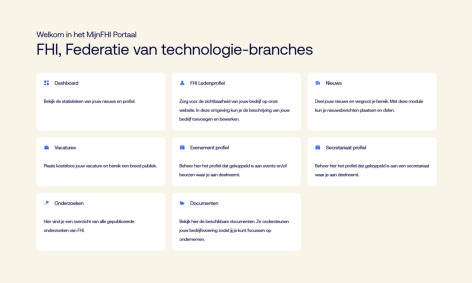
The Homepage
From the homepage, you can easily navigate to all sections of your profile. This guide covers the function of each button. Looking for something specific? Feel free to skip the other sections.
How can you, as a member or exhibitor, make maximum use of our platform?
In this environment you can manage everything related to the online functionalities of your membership. You can post news and vacancies, download documents, and make your profile visible to the industryThis guide will give you step-by-step instructions on how to get the most out of your member profile. If you have any questions, please feel free to email us at digitalservice@fhi.nl
From the homepage, you can easily navigate to all sections of your profile. This guide covers the function of each button. Looking for something specific? Feel free to skip the other sections.
As an FHI member you can make your profile extra attractive.
Please note: also fill in the field Email address (form) in. This email address generates the Contact Form on your profile. This allows visitors to your profile to contact you directly.
It event profile and secretariat profile work in the same way.
1. Click on “Event profile” or Secretariat profile.
2. Click on Edit Profile to adjust data.
3. Or go via the link to the homepage of the event or secretariat.
Please note: also fill in the field Email address (form) in. This email address generates the Contact Form on your profile. This allows visitors to your profile to contact you directly.
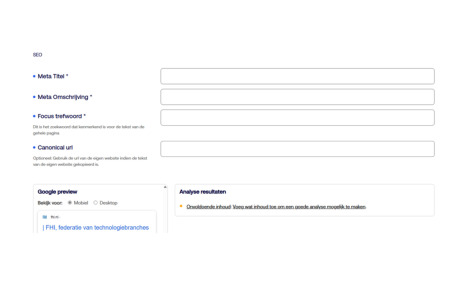
To make your article more discoverable via Google, you can use SEO (Search Engine Optimization):
As an FHI member you have the opportunity to post vacancies on our job board.
The vacancy remains six weeks online and then disappears automatically. You can then easily republish without having to re-enter all the information.
*Only available to FHI members
Through the component "Research"* You can participate in FHI industry research. Your input helps provide a current picture of the market. The more companies participate, the more representative the results, so don't hesitate to participate when research is open.
*Only available to FHI members
As an FHI member you will find under the tab “Documents”* Important documents for your company. You can download or request them directly here. Some documents contain confidential information. In that case, they will be shared with the main contact person from your organization when requested.
*Only available to FHI members

If you have any questions after reading this manual, please send an email to digitalservice@fhi.nl